Integrating Highcrest: A Practical Guide to Using Blackletter Typography in Modern Workflows
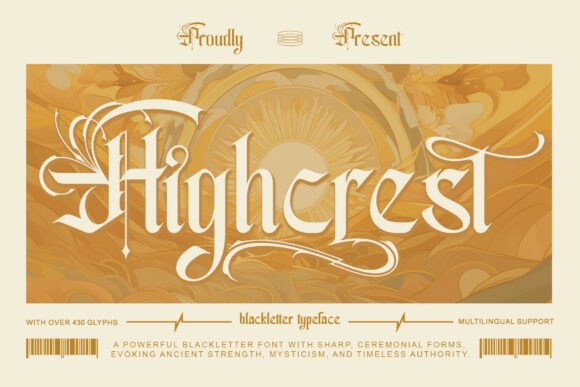
In the landscape of digital design and branding, typography is rarely just about choosing a pretty face for a letter; it is about selecting a voice. Highcrest, an elegant blackletter font inspired by classical medieval manuscripts and royal ceremonial lettering, offers a specific, authoritative voice that commands attention. However, utilizing a typeface with such a distinct historical and aesthetic presence requires more than just dragging and dropping it onto a canvas. To use Highcrest effectively, one must understand where it fits within a broader creative process, how to implement it across various platforms, and how to balance its ornate nature with functional legibility.
Understanding the Asset: Beyond the Aesthetic
Before beginning any design execution, it is vital to assess the tools at your disposal. Highcrest is not a workhorse font intended for body text; it is a display typeface. Its structure, rooted in heritage and prestige, is designed to deliver a powerful presence for specific applications. When planning a project—whether it is a luxury logo, wedding invitation, or editorial design—the decision to use Highcrest should happen early in the conceptual phase. It influences the entire visual direction. If you are crafting a brand identity for a modern tech startup, Highcrest may clash with the desired message of futurism and minimalism. Conversely, for a high-end brewery, a law firm, or a historical society, the font aligns perfectly with values of tradition and authority.
Strategic Placement in the Creative Process
Integrating Highcrest into your workflow begins with preparation. A common mistake in design implementation is selecting a font before establishing the content hierarchy. Highcrest excels in "hero" moments—the main headline of a website, the couple’s name on a wedding program, or the logo mark of a boutique packaging label.
Consider the workflow of an editorial designer working on a magazine layout. The process typically moves from content gathering to layout sketching, and finally to typographic styling. Highcrest should be introduced during the sketching phase. By mocking up potential covers or section headers with Highcrest early on, you can determine if the weight and texture of the blackletter style support the editorial narrative. This prevents the inefficiency of redesigning layouts later to accommodate a font that turns out to be too heavy or too complex for the allocated space.
Practical Implementation and Compatibility
Once the decision to use Highcrest is made, the technical execution requires attention to detail. Blackletter fonts are unique because of their high contrast and intricate strokes. When importing Highcrest into your design software—whether Adobe Illustrator, Photoshop, InDesign, or web-based platforms like Figma—you must immediately test for compatibility with your secondary typefaces.
A practical tip for pairing fonts is to look for contrast in structure but harmony in mood. Highcrest features sharp, angular lines and gothic curvature. Therefore, pairing it with a highly geometric sans-serif often creates a jarring, disjointed look. Instead, consider pairing it with a classic serif or a transitional typeface that shares some historical lineage but offers better readability for smaller text. For example, using Highcrest for the primary header and a clean, wide-tracked serif for sub-headers creates a visual bridge between the ancient and the modern.
Workflow Example: Branding and Logo Design
Let’s look at a specific scenario: designing a logo for a luxury brand. The workflow involves concept development, vectorization, and refinement.
- Concept Development: You select Highcrest to convey authority. You type out the brand name and explore different capitalizations. Blackletter fonts often have distinct capital letters that can stand alone as monograms.
- Vectorization: Once a specific glyph style is chosen, the text is converted to outlines (vectors). This is a crucial step in professional workflows. Converting Highcrest to outlines allows you to manipulate the anchor points, tightening the kerning or merging letters to create a unique ligature that feels bespoke rather than "off-the-shelf."
- Quality Control: You must test the logo at various sizes. Because Highcrest is inspired by manuscripts, it features fine details. At very small sizes, these details may bleed together. The workflow here involves creating a simplified version of the logo for small applications (like a favicon or a stamp) while retaining the intricate Highcrest version for large formats (like signage or packaging).
Application Across Different Mediums
The utility of Highcrest extends across various industries and deliverables. Understanding how to adapt the font to different mediums ensures consistency and quality.
Print and Packaging
In the realm of packaging, tactile quality is king. Highcrest is perfect for certificates, diplomas, and high-end product packaging. When preparing files for print, ensure that you are not relying on the font's digital rendering alone. If you are designing a label for a wine bottle, the interaction between the ink and the paper stock matters. Highcrest’s thick strokes may require slight adjustments to kerning (the space between letters) to prevent optical crowding. In your workflow, always print a physical proof before finalizing the design to ensure the prestige of the font translates to the physical medium.
Digital and Editorial Design
For digital use, such as website headers or social media graphics, efficiency and load times are factors. Highcrest, when used as a web font, should be optimized for web use to ensure fast loading. It is best used for static headers or hero images rather than dynamic text that changes frequently, as blackletter fonts can be difficult to read at lower resolutions on mobile screens. A practical workflow tip is to use Highcrest for the "title card" of a video or the header of a blog post, but switch to a legible sans-serif for the "read more" button or meta-data.
Organizing Your Typography Assets
For freelancers, agencies, and creators, managing font libraries is a workflow essential. Having Highcrest installed is not enough; it must be organized.
- Font Management: Use a font management tool to tag Highcrest under categories like "Gothic," "Formal," or "Luxury." This prevents you from forgetting you have it when a relevant project arises.
- Style Guides: If you implement Highcrest in a client's branding, document exactly how it should be used in the style guide. Specify that it is for "Display Use Only" and provide examples of incorrect usage (e.g., using it for body text). This acts as a safeguard for future consistency.
Long-Term Use and Mastery
Mastery of a specific typeface like Highcrest comes from repeated, intentional use. Over time, you will learn its quirks—how certain letter combinations look, which swashes work best, and how to balance its weight. By treating Highcrest not just as a font file but as a strategic component of your design toolkit, you elevate your work from merely "styled" to "authored." Whether you are a small business owner crafting a unique identity or a designer curating a mood board, Highcrest provides the heritage and visual gravity needed to make a lasting impression.