Integrating Dellanor Script into Your Wedding Stationery Workflow
In the world of wedding stationery and event design, typography is rarely just a final decorative layer; it is a foundational element that dictates the structural integrity of the design process. For designers, stationers, and DIY enthusiasts, selecting a typeface involves balancing aesthetic desires with technical constraints. Dellanor Script represents a specific category of asset—a romantic, luxury script font—that requires a distinct approach to workflow planning. Understanding how to integrate this ornate typeface effectively can transform a chaotic design phase into a streamlined production line, ensuring that the final deliverables exude sophistication without compromising on legibility or production timelines.
Strategic Planning and Asset Selection
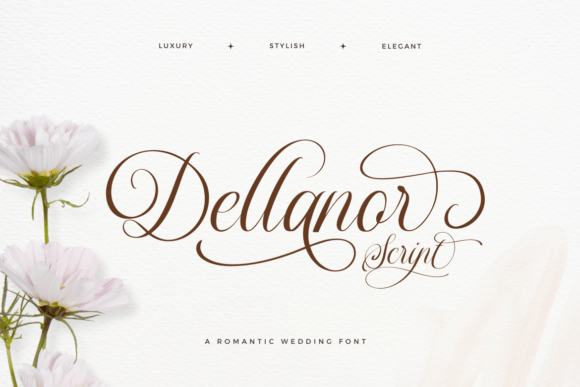
The decision to use Dellanor Script should occur early in the project lifecycle, ideally during the mood boarding and concept development phase. Because this font possesses distinct characteristics—namely its high contrast, decorative swashes, and romantic flair—it influences the surrounding design elements. If you wait until the layout phase to choose a font, you risk clashing styles. By identifying Dellanor Script as your primary display typeface early, you can select complementary serif or sans-serif fonts for the body text that do not compete for attention but rather support the elegance of the script.
Preparation involves more than just downloading the files. Before opening your design software, review the font’s character map. Dellanor Script is designed with alternative stylistic options. This means you need to plan for how you will access these variations within your specific environment, whether that is Adobe Illustrator, InDesign, Procreate, or Canva. Understanding the scope of the glyph library allows you to plan for customization. For instance, if the couple’s initials have complex ascenders or descenders, knowing that alternative swashes exist helps you plan a layout that accommodates flourishes without overlapping other text elements.
Technical Implementation and File Management
Integrating Dellanor Script into a professional workflow requires attention to technical compatibility. As a digital asset, it must be installed correctly across all devices involved in the project. If you are collaborating with a printer or a separate layout artist, ensure that the font licensing allows for sharing or that all parties have access to the same version. Version control is critical; using an older version of a font file can result in missing glyphs or spacing discrepancies that disrupt a carefully aligned layout.
When setting up your document, consider the medium. Dellanor Script excels in vector-based environments where scalability is paramount. However, the ornate nature of the font means that small sizes can lead to ink traps or loss of detail in print. A practical step in your workflow is to create a test print early in the process. Print a sample of the text at the intended size on the intended paper stock. This quality control check ensures that the "luxury" feel of the font translates physically and that the thin strokes of the script remain legible. If the text is for a sign intended to be viewed from a distance, verify that the decorative elements do not blur together when scaled up.
Design Execution and Customization
Once the technical groundwork is laid, the focus shifts to execution. The true value of Dellanor Script lies in its ability to be personalized. In a standard workflow, designers often type out the text and adjust the tracking or kerning. However, with a font that offers alternative characters, the process becomes more interactive.
Consider the names of the couple. A standard "and" might look functional, but Dellanor Script likely offers a stylistic alternative that flows better between specific letter combinations. This requires a manual workflow step: swapping out default characters for stylistic alternatives. In Adobe Illustrator, this is done via the Glyphs panel. In other platforms, it may require accessing the Character Map. Building time into your schedule for this "micro-typography" stage is essential. It is the difference between a generic template and a bespoke invitation.
Layering and Composition
Because Dellanor Script is a display font, it works best when given space to breathe. In your layout process, avoid crowding the script with dense blocks of information. Instead, use a hierarchy where the script handles the names and key phrases, while a clean sans-serif handles the logistical details like dates, times, and addresses. This interaction between fonts creates a rhythm that guides the eye.
Furthermore, consider how the font interacts with graphical elements. If you are using watercolor backgrounds or floral illustrations, ensure that the text remains legible. You may need to apply subtle drop shadows or use a semi-transparent overlay behind the text. This is a post-processing step that ensures the "romance" of the font is not lost against a busy background.
Production and Output
The final stage of the workflow involves preparing the files for production. When working with Dellanor Script, standard pre-press checks apply, but with added scrutiny.
- Outlining Fonts: Before sending files to a print shop, always convert the text to outlines (vectors). This prevents font substitution errors where the printer’s computer might render Dellanor Script differently than your design station.
- File Formats: Deliver high-resolution PDFs that preserve the vector data. Avoid flattening the image if possible, as this can rasterize the fine details of the ornate lettering.
- Specialty Printing: If the project involves foil stamping or letterpress, the vector paths of Dellanor Script must be clean. Ensure there are no open paths or stray points in the font file, which can cause errors in die-cutting or plating.
By treating Dellanor Script