Splashed: The Rhinestone Script Font That Turns Words Into Sparkle
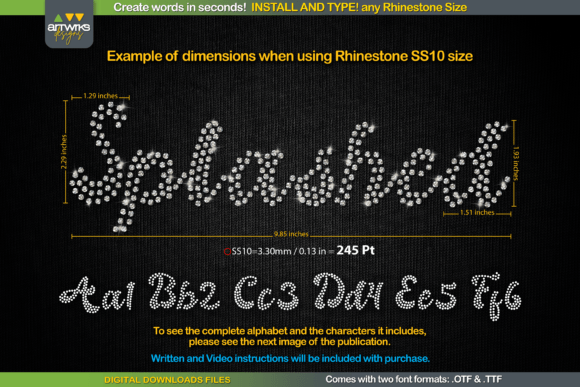
You know that moment when you have a perfect phrase in mind for a custom tumbler, a birthday banner, or a bold marketing piece, but the thought of spacing individual rhinestones makes you want to close your laptop? That is the exact problem Splashed solves. It is a specialized rhinestone template font designed to let you type words and instantly get a design where every letter is perfectly filled with stone placements or arranged for clean, trapped heat transfer vinyl cuts. No more manual dot-by-dot spacing. No more guessing if your adhesive will hold. Just type, and the font does the heavy lifting.
For anyone who works with custom apparel, personalized gifts, or event décor, Splashed is not just another script font. It is a practical tool that bridges the gap between creative vision and finished product. Imagine you run a small Etsy shop selling custom rhinestone tumblers. A customer messages you asking for a 15-word phrase for a bachelorette party gift. Without a template font, that order could take hours of careful placement. With Splashed, you type the phrase into your design software, adjust the size, and you have a ready-to-cut template in minutes. That speed translates directly to more orders fulfilled and less time hunched over a workbench.
Where Splashed Really Shines
The true value of Splashed becomes clear when you think about specific, real-world moments. It is not about having a fancy font; it is about solving a tangible problem in your workflow. Here are some scenarios where this font changes the game.
For the Small Business Owner
Let’s say you own a local print shop that does custom rhinestone apparel for sports teams, cheerleading squads, and corporate events. A last-minute order comes in for 50 team jackets with player names on the back. Traditionally, you would need to design each name individually, carefully aligning rhinestones. With Splashed, you can generate all 50 names quickly, ensuring consistent spacing and style across every jacket. The time saved here is not just convenience; it is profit. You can take on more projects without sacrificing quality or burning out your team.
For the Creative Hobbyist
Maybe you are a crafter who loves making personalized gifts. Your niece is turning sweet sixteen, and you want to make her a dazzling denim jacket with her name in rhinestones. You are not a professional designer; you just want something that looks amazing without a steep learning curve. Splashed lets you open your cutting software, type her name, and see a design that is already optimized for rhinestone placement. The letters are filled uniformly, so you do not have to worry about gaps or overcrowding. You can focus on the fun part—picking colors and applying the stones—instead of stressing over the technical layout.
For Educators and Event Planners
Teachers organizing a school fundraiser or volunteers planning a community event often need to create eye-catching signage or apparel on a tight budget. They might not have access to professional designers or expensive software. Splashed works with common design programs and cutting machines, making it accessible. You can create a sparkling banner for a school play or custom rhinestone t-shirts for a charity walk without needing specialized skills. The font’s trapped design means the vinyl cuts cleanly around each letter, reducing waste and frustration—especially important when you are working with limited materials or volunteers.
Why the Details Matter
What makes Splashed different from just typing in a standard script font and adding dots manually? The key is in its construction. Each letter is designed as a template, meaning the rhinestone placements are pre-calculated for proper spacing and fill. This is crucial for two reasons. First, it ensures that when you apply the stones, they sit evenly without overlapping or leaving unsightly gaps. Second, for heat transfer vinyl users, the “trapped” design means the negative space around the letters is preserved, so you can weed the vinyl efficiently and get a clean transfer onto fabric.
Think about the last time you tried to create a custom text design from scratch. You probably spent more time adjusting letter spacing, resizing dots, and troubleshooting adhesion issues than actually crafting. Splashed eliminates that friction. It is like having a seasoned rhinestone artist whispering in your ear, “That’s the right size, that’s the right spacing, go ahead.” The result is not just faster production—it is more consistent quality. Whether you are making one item or one hundred, each piece looks professionally crafted.
Practical Considerations Before You Dive In
Before you download or purchase Splashed, there are a few practical things to keep in mind to ensure it fits your needs.
- Software Compatibility: Splashed is a font file, so it works with most design software that supports OTF or TTF fonts, such as Adobe Illustrator, CorelDRAW, or free options like Inkscape. However, you will need a cutting machine software (like Cricut Design Space or Silhouette Studio) to actually cut the templates. Make sure your workflow includes these tools.
- Learning Curve: While the font simplifies the design process, you still need basic knowledge of how to import fonts, adjust text size, and send designs to your cutter. If you are brand new to crafting, spend a little time watching tutorials on using script fonts with your specific machine.
- Project Suitability: Splashed is ideal for text-based designs. If your project involves complex logos or intricate illustrations, you will still need other design resources. It is a specialized tool for words and phrases, not a catch-all solution.
- Material Planning: Remember that rhinestones and vinyl have physical limits. Very small text might not hold stones well, and very large text could require more material than you budgeted for. Use the font to test sizes on scrap material before committing to your final project.
Connecting Features to Real Outcomes
It is easy to list features like “pre-filled letters” or “trapped design,” but what does that actually mean for your Tuesday afternoon project? It means fewer wasted stones because your template is precise. It means less time weeding vinyl because the negative space is clean. It means you can finally offer custom rhinestone text products in your shop without quoting customers a week-long turnaround time. The font’s design directly impacts your efficiency, material costs, and customer satisfaction.
For marketers or bloggers, Splashed can even be used to create unique social media graphics or promotional items. Imagine a giveaway where the prize is a custom rhinestone notebook with the winner’s name. You can generate those designs quickly for multiple winners, adding a personal touch that feels premium without the premium time investment. The font bridges the gap between digital design and physical product, which is invaluable in an era where personalized experiences drive engagement.
Final Thoughts on Making It Work for You
Ultimately, Splashed is about empowering you to create more with less hassle. It is not a magic wand that does all the work for you, but it removes one of the biggest bottlenecks in custom text design: the layout. Whether you are a parent making a one-time gift, a teacher organizing a school event, or an entrepreneur scaling a personalized product line, this font adapts to your context. The key is to start with a clear project in mind, test the font with your specific materials and machine, and then let it streamline your process.
The next time you have a phrase that needs to sparkle, remember that the design phase does not have to be the hardest part. With Splashed, you can move from idea to finished product with confidence, knowing that each letter is ready for the spotlight. Focus on your creativity, your message, and your audience—and let the font handle the rest.